
Skip to contentYour privacy, your choice.

With your permission, Google Analytics helps us understand visits and improve this site. Essential preference cookies stay on. No advertising cookies.

Cookie details
FTS
CeriseUser manualFind a resellerSupport
EN
EnglishFrançaisDeutsch日本語Español简体中文Italiano한국어Portuguêsहिन्दीالعربية
Buy Cerise
CeriseUser manualFind a resellerSupport
Browse manual
  1. Getting started
    1. Using Cerise with an iPad
    2. Using Cerise with a Console
    3. Using the wired DMX adapter
  2. Product specifications
  3. Updating Cerise
  4. Factory reset
  5. User Interface / Settings
    1. Config
    2. Console
  6. App setup
    1. Blackout Lighting Console
    2. Luminair app
  7. Troubleshooting
    1. Nothing pops up when I plug in Cerise
    2. Blackout won’t output anything. Cerise is properly detected, displays as a network interface, I can access the WebUI but I can’t get data out of Blackout
    3. WebUI won’t load in my web browser but I have a Cyan LED/USB/Ethernet link
    4. Cerise stops working or becomes unreliable when my iPad battery reaches 100%
    5. I lose data communication after my ipad goes to sleep or I don’t get anything when I plug in Cerise when my ipad is locked.
  8. Frequently asked questions
    1. Does Cerise work on my iPad with a lightning connector ?
    2. On what device will Cerise work ?
    3. I can’t seem to detect Cerise on my iPad
    4. I’ve changed my IP address but I can’t connect anymore
    5. Can I use CRMX Toolbox with Cerise ?
    6. I don’t have CRMX linking key on my Cerise
  9. FCC Caution
Read all on one page
Cerise / User manual
Latest Cerise firmwareFull manual PDF
Getting started/User Interface / Settings

Console

Untitled
Untitled (1)

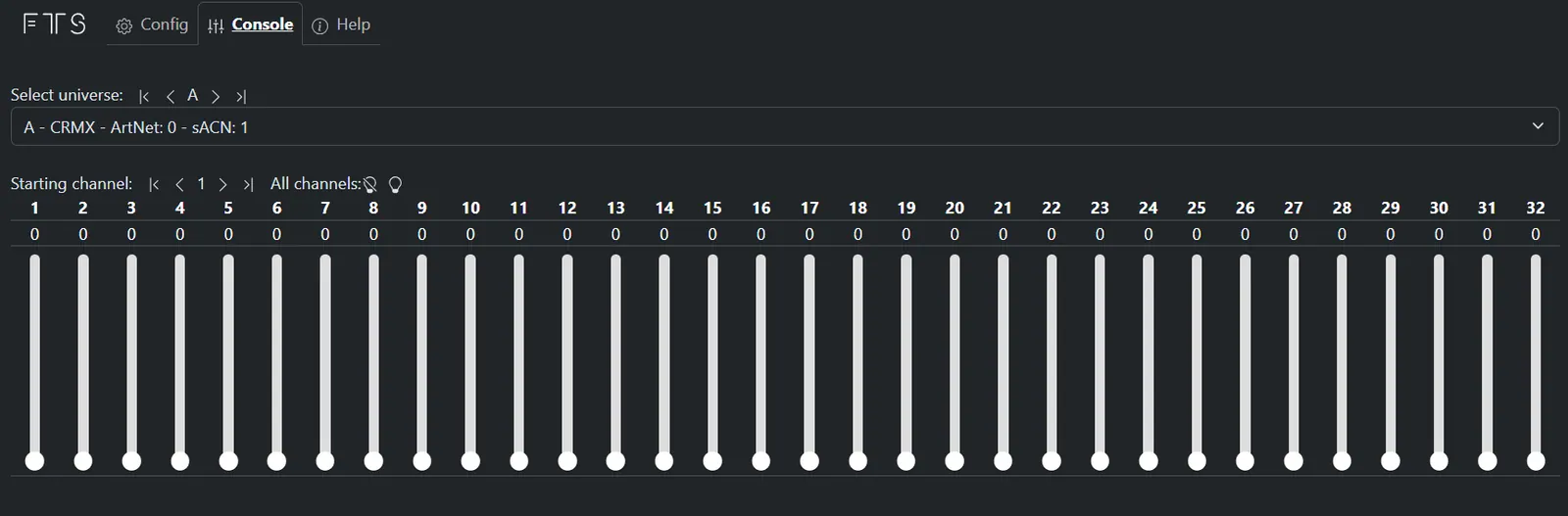
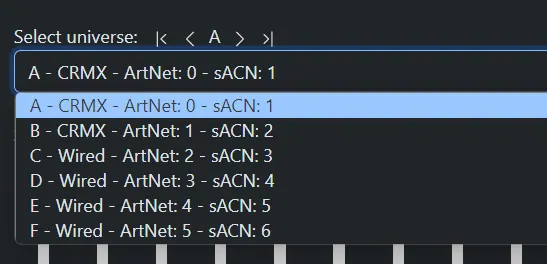
The Select universe menu lets you choose outputs A to F. The drop-down shows which universe you are viewing and whether it is a wired or wireless universe.

The console can be used as a basic fader board, if there is network data coming in via Art-Net or sACN it will be displayed and the faders will be rendered inoperable.

PreviousConfigNext How to set it up
Downloads Read all on one page
FTS
User manualSupportFind a resellerCommunity Instagram WhatsApp +33 7 49 06 11 35
© 2026 FTSLEDTerms & conditions of saleCookie settingsBack to top
Chat with us on WhatsApp